Chrome Manifest V3 introduced significant security restrictions to extensions. One of the biggest gotchas: service workers can't directly play audio. This limitation breaks common patterns for audio-heavy extensions. Here's how to solve it using offscreen documents.
The Problem: Why MV3 Service Workers Can't Play Audio
Manifest V2 allowed extensions to use background pages, which are full DOM documents running in the background. You could play audio directly on a background page using standard HTML audio elements.
MV3 replaced background pages with service workers, which are more isolated and more secure. Service workers are designed to respond to events, not to maintain persistent UI state. They're designed to sleep when not needed, which is incompatible with audio playback - audio needs a persistent context.
The security model is intentional. Service workers have fewer capabilities to reduce the extension's attack surface. But it means you need a different approach for audio.
The Solution: Offscreen Documents
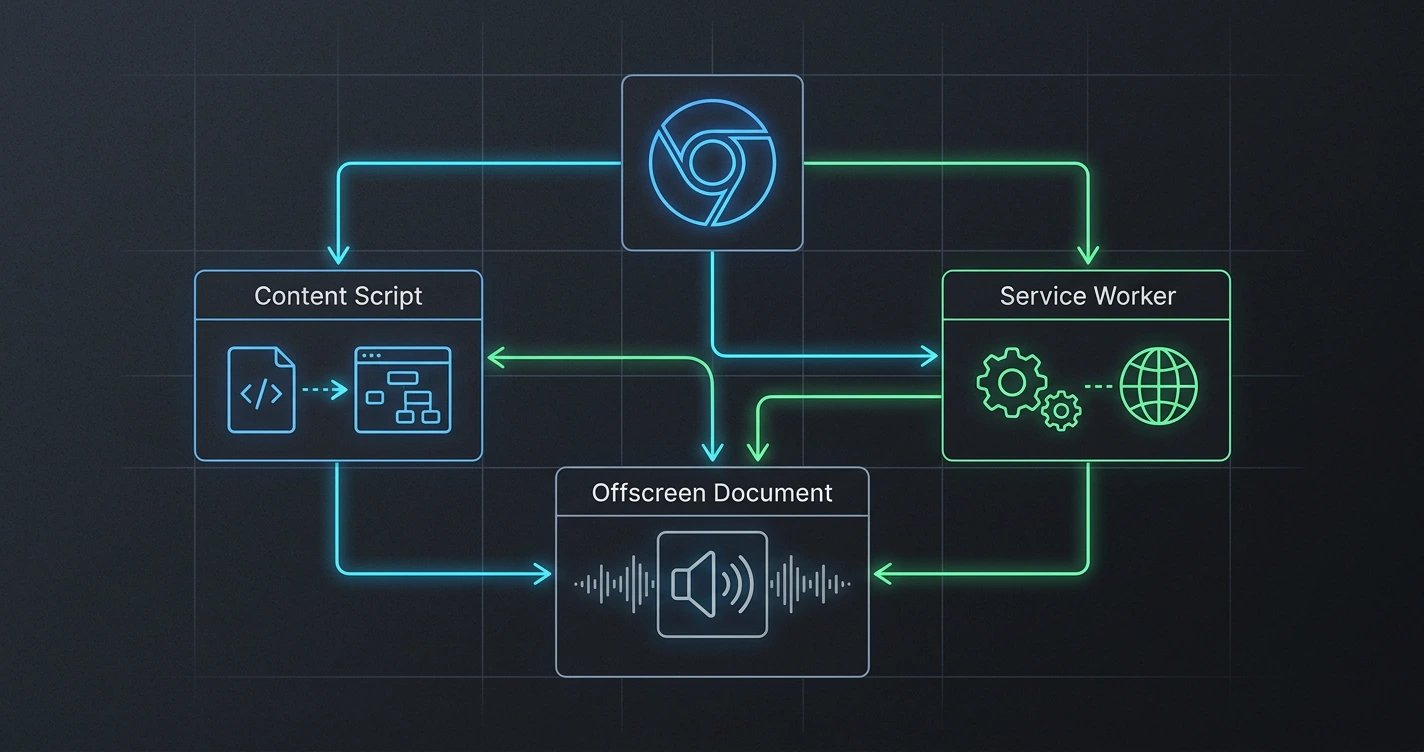
Google's answer is offscreen documents. An offscreen document is a special type of document that runs in the background without a visible window. It's created by the service worker and managed through the Chrome API.
Here's the architecture:
The service worker never touches audio directly. It sends messages to the offscreen document: "Play this audio" or "Pause." The offscreen document handles the actual playback.
Implementation Pattern
Here's the basic flow:
1. Create the Offscreen Document
The offscreen document is created on demand. Chrome tracks it - you can only have one per extension. The reason field is mandatory and must match your use case (AUDIO_PLAYBACK in this case).
2. Build the Offscreen Document
The offscreen document contains a simple audio element and listens for messages from the service worker. When a message arrives, it controls the audio.
3. Send Commands from the Service Worker
The service worker uses sendMessage to communicate with the offscreen document. This is two-way - the offscreen document can also send messages back (useful for progress updates).
Key Implementation Details
Only one offscreen document per extension. Check if it exists before creating. If you need to update it, send messages instead of recreating it.
Audio generation happens elsewhere. You probably won't have the actual audio file URL. In most cases, you'll generate audio (like text-to-speech) in the service worker or a web worker, then pass the blob or data URL to the offscreen document.
Life cycle management. The offscreen document stays alive as long as the extension is running. Chrome will clean it up when the extension is disabled. You can explicitly close it with chrome.offscreen.closeDocument() if needed.
Security considerations. The offscreen document runs in a sandboxed context. It can't access your extension's main pages or content scripts directly - communication is only through messaging. This is intentional and keeps your extension secure.
Common Pitfalls
Forgetting to check if the document exists. If you call createDocument twice, the second call fails. Always check hasDocument() first.
Treating the offscreen document like a UI. It has no visual component. You can't render anything in it. It's purely for background computation or audio playback.
Not handling message failures. If the offscreen document doesn't exist when you send a message, it fails silently. Either ensure the document exists first, or wrap messages in try-catch.
The offscreen document pattern is Google's official solution for this MV3 limitation. It works well once you understand that you're essentially using a headless document for capabilities that the service worker doesn't have. (:
Why This Pattern Matters
Understanding this pattern is crucial for building any audio extension in MV3. Video extensions have similar limitations. The broader lesson is that MV3's restrictions are intentional security improvements - they require different architecture thinking, but the resulting extensions are more secure and more efficient.
Once you internalize the offscreen document pattern, you realize it's not a workaround - it's the right way to build audio features in modern extensions.